One box at the gate. One pass per family.
The gatekeeper types a student's code or name. The people your office allowed to visit appear with their photos. Tap who came, let them in, and the pass prints.
Ballygunge
VISITOR
Mother
Visiting Ishita Biswas
In 19 Nov, 8:30 pm
A pass for a demo visit: ID-card size, black on white, with a barcode to scan out.
At the gate
In, out, and who is still inside.
Find the student
Type the student's code or name. Their card opens with their allowed visitors, as photos.
Tap who came
One person, or several who came together. Add anyone extra, why they came, and their photo if your gate takes one.
Let in and print
One visit and one pass naming everyone who came. They leave together on it.
Scan out
Scan the barcode or type the pass code, check the photo, and record the exit.
Set up by the office
Only the people a student's family allowed.
On a student's page, the office adds each person who may visit, with a clear photo, their name and relation, such as Mother or Uncle. The gate checks that photo before letting anyone in.
- Switch a visitor off and the gate no longer lets them in. They stay on the list.
- A delivery or a guest of the office comes in as a walk-in, with a name and mobile.
- A visit still open from an earlier day asks when they left.
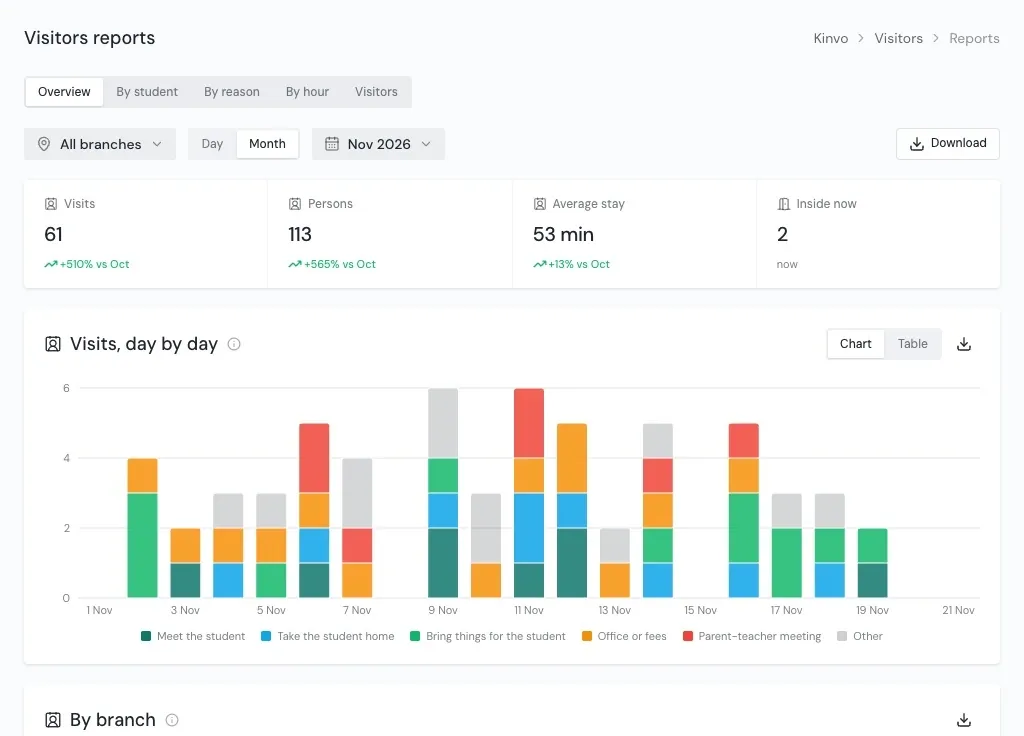
Log and reports
Every visit, from the moment the gate lets someone in.
- The visit log
- Every visit by day or range, with why they came and whether they are still inside, and both photos: the one on file and the one taken at the gate.
- By student and by reason
- Who gets the most visits, and why visitors come.
- By hour
- The gate's busy hours, to plan who keeps it.
- Average stay
- Visits, persons with those who came along, and how long they stayed.
Questions
About Visitors
How does the gate know a visitor is allowed?
Does a family that comes together get one pass?
What printer does the pass need?
Can we let in someone who is not visiting a student?
See Kinvo with your own student list.
Send us the Excel file you use today. We import it and walk you through your own school on a call.